


Utah Tech is Moving to Zoom Phone
IT Services is pleased to announce that Zoom Phone has been selected as the university's new telecommunications platform. Zoom Phone will replace the Cisco Voice system that has been in use for nearly 25 years.
This move will bring new and modern telecommunications and collaboration features to employees, including:
- Voice and collaboration integration with the university's existing Zoom Meetings system
- SMS test messaging available on any campus extension
- Hardware Telephones on desks are now optional - software phone (soft phone) services are available on any device that runs the Zoom app, like computers and mobile devices
- Bluetooth and USB headset capability with hardware phones and soft phones
- Campus telephone extensions can be used for calls and texts, anywhere, not just on campus
Timeline
Under current plans, most campus extensions and phones will be moved to Zoom Phone early in Spring Semester 2027. Some departments and individuals will move to Zoom during Fall 2026. More details about the timing of the transition will be forthcoming.
Project Details
This is a large project that will require close coordination with departments as we move to the new system. All existing Cisco phone hardware must be replaced, however because of the flexibility of Zoom Phone, not every Cisco phone needs to be one-for-one replaced. Departments and individuals can choose from options including:
- A traditional phone handset on their desk
- Software phone services using the Zoom app on workstations and laptops
- Software phone services using the Zoom app on mobile phones and tablets
- Any combination of the above options
Phone billing charges will remain unchanged. Departments and budget admins will be charged $12 per month for each campus extension they use.
Frequently Asked Questions
Will I keep my campus extension number?
Absolutely. All of our existing numbers will be ported into Zoom Phone and no extensions will change.
Do we have to replace our department's phones?
All Cisco phones will have to be replaced. However, hardware phones don't have to be replaced one-for-one. Other options, such as using the Zoom app as a soft-phone on mobile devices or computers are available.
Will departments / budget admins have to pay to replace phones?
No, for existing lines with an existing Cisco phone handset. IT Services will accept a trade-in of your existing Cisco handset for a basic Polycom at no cost, if employees want to continue to have a hardware phone on their desk. If you choose to use a soft-phone option, using the Zoom app on your computer or mobile device, there is also no replacement charge. New lines for employees who want a hardware desk phone handset will be charged for the phone.
What should we do with our old Cisco phones?
These phones have no useful function on campus after the transition to Zoom phone is complete. For existing phones with lines attached, trade them in if you would like a new basic handset. If you are storing old Cisco phones, stop. Clean them out your closets and cabinets and turn them into IT to be surplussed.
What is a soft phone?
Rather than having a hardware phone sitting on a desk, a soft phone uses software to make and receive phone calls. This can be done using the Zoom app on any campus computer or on mobile devices. Phone calls are made or received right in the same Zoom app you use for meetings. Bluetooth or wired headsets and earbuds can be used for conversation privacy.
What hardware phone models are available?
Polycom phones will be the campus standard moving forward. IT Services will offer basic, mid-tier, and premium phone models for departments and individuals who want to replace the phones on their desk. Since August 2026, Network Services has started distributing Polycom phones that will not need to be replaced as they are fully compatible with Zoom Phone. If you already have one of these models of phones you will be ready to move into Zoom when the time comes. IT Services has all of these models available for you to see if desired.
|
Polycom Edge 220 - Basic Most campus users with 1 - 4 extensions |
Polycom Edge 350 - Midtier Campus users with more than 4 extensions |
Polycom Edge 550 - Premium Campus users with many extensions and special use cases |
|||
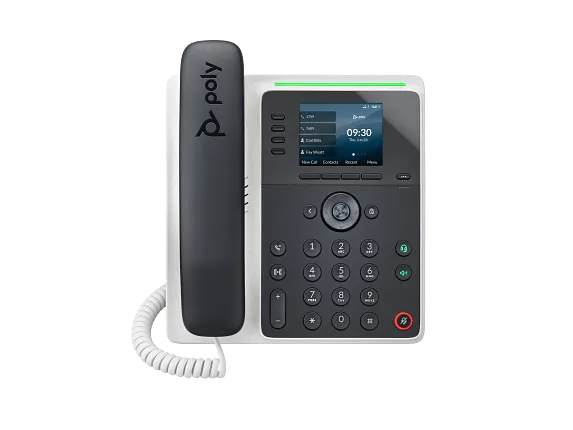 |
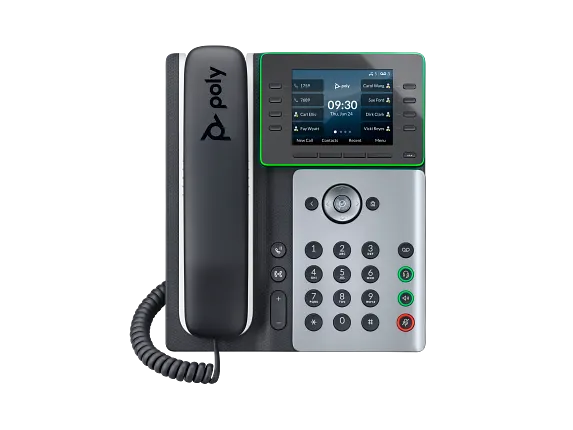 |
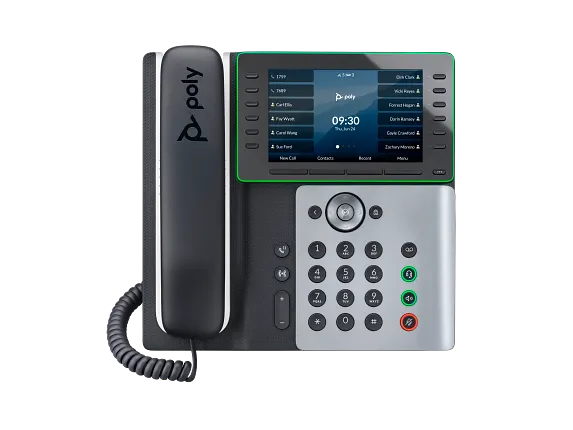 |
|||
|
|
|
|||
| Price (new line): |
$110 |
Price (new line): |
$220 |
Price (new line): |
$335 |
| Price (w/existing line and trade-in): |
$0 |
Price (w/existing line and trade-in): |
$110 |
Price (w/existing line and trade-in): |
$225 |
|
During the transition, an existing phone with an existing attached line can be traded at no cost for an Edge 220, or for one other other models at list price minus the price of an Edge 220. New lines or phone handsets not currently attached to a line are not eligible for trade-in pricing. |
|||||
*Prices subject to change based on availability and cost fluctuations.
Will there be changes to how phone services are billed?
Generally, no. Departments / budget admins will continue to be charged $12 per month per extension assigned.
Can I still have multiple lines or extensions assigned to my phone?
Yes. Zoom supports multiple line extensions in both hardware and software phones.
How will SMS text messages work with Zoom Phone?
Employees will be able to send text messages to and from the Zoom app on their work extension. This feature should be a game changer for individuals and departments that work closely with students. This feature is generally intended for one-on-one or small group texting, similar to a personal mobile phone. If you need to do mass texting, talk to IT Services for other, more appropriate options to accomplish your mass texting goals.
If I use my mobile device as a soft phone, can I set quiet hours when I am not working?
Absolutely. You can set the Zoom app to not ring your work extension during evenings and weekends.
I don't want to use Bluetooth earbuds for a headset with the Zoom App. What wired models of headsets will work?
Basically any USB or 3.5 mm headphone jack (assuming your computer has a 3.5 mm audio jack. Almost all desktop computers do, laptops are hit and miss) compatible headset should work with the Zoom app on your PC or Mac. Here's an Amazon search of several models that would be acceptable: https://www.amazon.com/s?k=work+usb+headset&ref=sr_nr_p_rag_integrated_qb_3

