

How do I manage how calls are handled in Zoom Phone?
Last updated: Nov 19, 2026
7
views

All of your call handling settings can be accessed via your Zoom Phone settings in your Zoom account. Visit this site:
https://utahtech-edu.zoom.us/pbx/page/telephone/myZoomTelephony#/my-cloud-phone/settings
Scroll to Call Handling.
You can edit the business hours you wish your phone to ring. You can also set what apps and devices will handle calls.
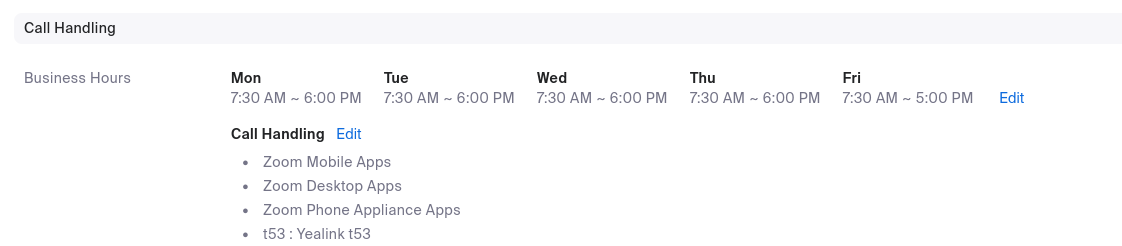
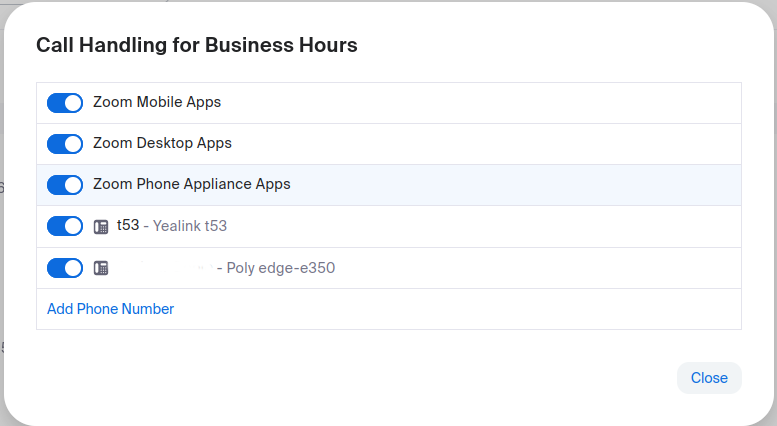
You can select which devices / apps you want to ring. If you do not want your Zoom app on your mobile phone to ring your work extension, turn off the 'Zoom Mobile Apps' switch
You can also have your number ring on an outside line (such as a personal cell phone) by clicking 'Add Phone Number' and entering the external number you want to have your work calls also ring.

